No Coverage Report
This report displays at the end of every "day" defined at the location level. Use this report to see if any locations that were scheduled got missed. You can also choose to get an alert if the location is missed entirely. The alert will be sent to Managers marked Trained on the location at the end of the "day" defined for each location.
To view the No Coverage Report:
- Navigate to Reports > Time > No Coverage Report
- Select the desired date range, Customer and Location
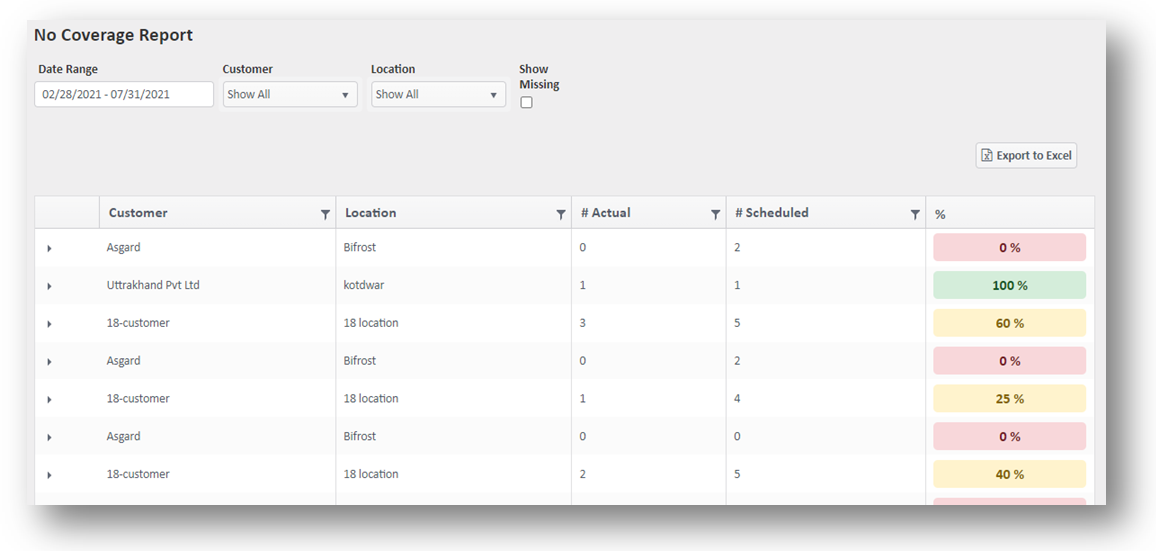
- Only locations that had scheduled shifts will appear on this report
- After the "day" you defined on the location is over, the report will show if any locations were missed by comparing the number of schedules to the number of clock ins
- Red (0%) - No one showed up for any scheduled shifts that day
- Yellow (x%) - Some of the employees showed up but not all
- Green (100%) - All employees showed up
- Click the arrow on the left to see which employees clocked in and when
- If the employee who clocks in is not the employee on the schedule, it will still register that someone clocked in to cover the location, and the location will not appear as missed
For more information, or to send in a request to the Janitorial Manager support department, use the red 'Help' button in the bottom right corner of any Help Desk article.
Comments
0 comments
Please sign in to leave a comment.