Automatic Time Punch
The Automatic Time Punch setting allows scheduled time to be automatically added to an employee's timecard. This can be beneficial in situations where:
- The employee does not have access to a clock-in method.
- The employee has not been taught how to clock in yet.
Setting Up Automatic Time Punch
- Navigate to Employees > Manage Employees.
- Select the Edit Pencil for the desired employee.
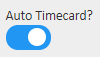
- Under General Information, enable the Auto Timecard switch.
- Select Save to confirm changes.
Creating Schedules for Automatic Time Punch
Automatic Time Punch adds time based on schedules made for the employee. If the employee has not clocked in, and the Late In Alert time has been reached, time will be added automatically for that employee.
To learn more about adding schedules to the system, follow the links below:
Setting Up Timekeeper Employees

As an example, an employee might be scheduled for a location from 9:00 AM to 5:00 PM.
If the Late In Alert is set to five minutes, the scheduled time will automatically be added for that employee at 9:05 AM.
If the employee clocks in between the start of their scheduled time (9:00 AM) and the Late In time (9:05 AM), the system will not automatically add the time.
For more information, or to send in a request to the Janitorial Manager support department, use the red 'Help' button in the bottom right corner of any Help Desk article.
Comments
0 comments
Please sign in to leave a comment.