Email to Text
Changing the email address on file for an employee will turn email notifications for Work Order completions, Inspection completions, and Customer Portal alerts sent by JM into text messages. We found that it is best to use the MMS formula for many carriers as any alerts that exceed the SMS character limit may be cut off prematurely.
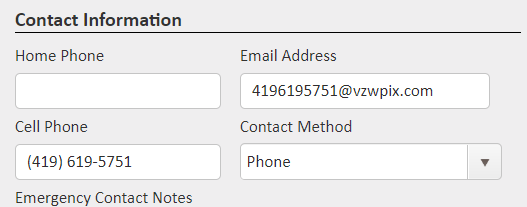
If you wish to use the text message style, you will need to replace the employee's email address in the Contact Information section to match the address of their provider based on the formula below. It is recommended that you test this formula by sending an email to the recipient's address outside of JM first to confirm that it works for their carrier.
Formula: Substitute a 10-digit cell number for ‘number’ for the carriers
- AT&T: number@txt.att.net (SMS), number@mms.att.net (MMS)
- T-Mobile: number@tmomail.net (SMS & MMS)
- Verizon: number@vzwpix.com (MMS)
- Sprint: number@messaging.sprintpcs.com (SMS), number@pm.sprint.com (MMS)
- Virgin Mobile: number@vmobl.com (SMS), number@vmpix.com (MMS)
- Tracfone: number@mmst5.tracfone.com (MMS)
- Metro PCS: number@mymetropcs.com (SMS & MMS)
- Boost Mobile: number@sms.myboostmobile.com (SMS), number@myboostmobile.com (MMS)
- Cricket: number@sms.cricketwireless.net (SMS), number@mms.cricketwireless.net (MMS)
- Republic Wireless: number@text.republicwireless.com (SMS)
- Google Fi (Project Fi): number@msg.fi.google.com (SMS & MMS)
- U.S. Cellular: number@email.uscc.net (SMS), number@mms.uscc.net (MMS)
- Ting: number@message.ting.com
- Consumer Cellular: number@mailmymobile.net
- C-Spire: number@cspire1.com
- Page Plus: number@vtext.com
- Rogers: number@pcs.rogers.com
- Bell Mobility: number@text.bell.ca
- Telus: number@msg.telus.com
Comments
0 comments
Please sign in to leave a comment.