Cleaning Times vs. Area Estimations
The Cleaning Times vs. Area Estimation Report compares actual labor time to estimated Area times.
Cleaning Times vs. Area Estimation Report
Setting up Area Estimations
Area Estimations compare an Area's Cleaning Duration (the time it takes for a user to scan in and out of a QR Code) to an Estimated Area Time (the estimated time it takes to clean/service an Area).
- From the portal site, navigate to Customers > Manage Locations.
- Select the Edit Pencil for the desired Location.
- Select the Area subtab.
- Add an Area by selecting + Add Area, or select the Edit Pencil for an existing Area.
- In the Estimated Area Time field, add the estimated time (in minutes) that it takes to clean/service the Area.

- Select Save.
Cleaning Times vs. Area Estimation Report
To access the report:
- From the desktop site, navigate to Reports > QR Area Reports or Employee QR Scan Reports > Cleaning Time vs. Area Estimation.
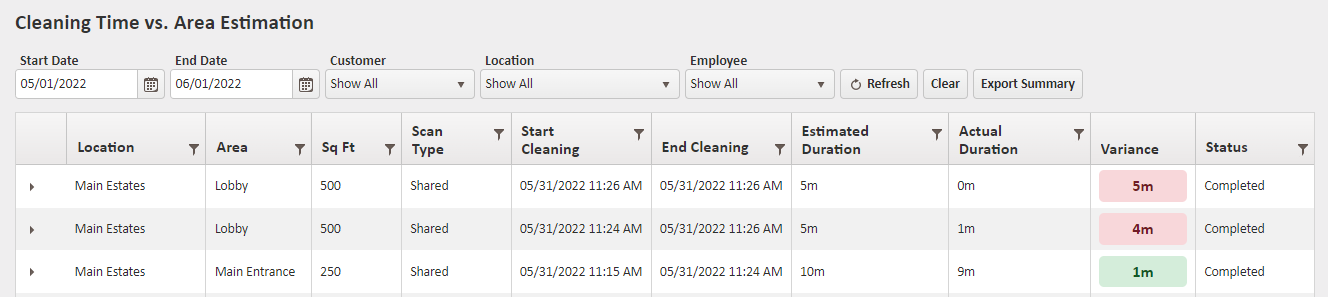
Location - The Location that the Area belongs to.
Area - The Area where the cleaning/service was performed.
Sq Ft - The square footage of the Area.
Scan Type - Shared or Individual.
Start Cleaning - The date and time a user began cleaning/servicing an Area (based on QR Code).
End Cleaning - The date and time a user finished cleaning/servicing an Area (based on QR Code).
Estimated Duration - The estimated time it takes to clean/service this area.
Actual Duration - The amount of time it took for the user to finish cleaning/servicing the Area (based on QR Code).
Variance - The difference between the Estimated Schedule Duration and Actual Duration. The Variance appears as different colors depending on the percentage (based on the difference).
- Less than or equal to 15% appears as green.
- Less than or equal to 30% appears as orange.
- More than 30% appears as red.
Status - The status of the scan.
For more information, or to send in a request to the Janitorial Manager support department, use the red 'Help' button in the bottom right corner of any Help Desk article.
Comments
0 comments
Please sign in to leave a comment.