Text is Missing/Black Bar Replacing Text on JM Connect
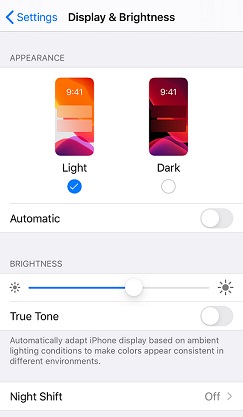
If you are using an iPhone, and some text is missing or is replaced by a black bar, this is caused by using Dark Mode.
For the time being, please remove Dark Mode from your iPhone while using the mobile app.
Navigate to Settings > Display & Brightness > Select the option for Light
For more information, or to send in a request to the Janitorial Manager support department, use the red 'Help' button in the bottom right corner of any Help Desk article.
Comments
0 comments
Please sign in to leave a comment.