Error: Enter Valid Space
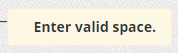
When setting up area templates, each area must be assigned a percentage to total 100% overall.
When entering a percentage, no more than 100% total can be entered.
Example: If you attempt to allocate 10% to an area when you are already at a total of 93% you will encounter this error.
You can determine the total area already in use at the bottom of the list of areas

For more information, or to send in a request to the Janitorial Manager support department, use the red 'Help' button in the bottom right corner of any Help Desk article.
Comments
0 comments
Please sign in to leave a comment.