There is a quick and easy way to convert any amounts listed in USD to any other currency type based on the current exchange rate. You can also use this formula to multiply distance or time amounts by a specific rate to get a payment amount.
- First, click here to see the current exchange rate from any currency, updated live by xe.com! (Or, you can use any other site of your choice!)
- Copy the rate with all of the available decimal places
- Then, export your list or report to Excel
- In Excel, find the column currently in USD. Is there data in the column to the right?
- If there is no data in the field to the right, skip to step #8
- If there is data in the field to the right, right-click your mouse on the column letter
- Select Insert to add a blank column there (Your other columns will shift to the right automatically)
- In the first cell in the blank column, type in the name of the currency type you're changing to (Euros, Pounds, etc.)
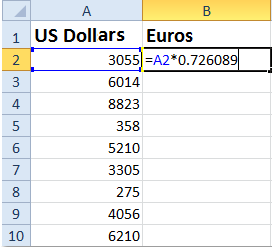
- In the first blank cell below that, start the formula by typing an = sign
- Then, select the cell to the left that is currently in USD
- Now type a * symbol to multiply
- Lastly, paste in the current exchange rate based on the currency type that you copied from the link above in Step 2
- Here's an example of what it might look like
- Press Enter on your keyboard (The new currency amount will be listed in the cell)
- To copy the same formula in that column down your entire list, double-click on the bottom right corner of the cell (The entire column will auto-fill based on the formula)
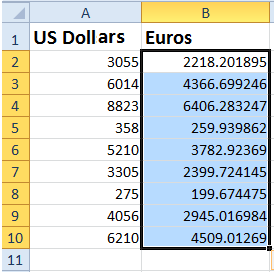
- To add a symbol for your currency type in the new column, click on the column letter to highlight the entire column
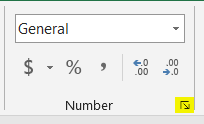
- Then, in the Number section of the Home tab, select the arrow in the right corner
- In the Number tab, select Currency
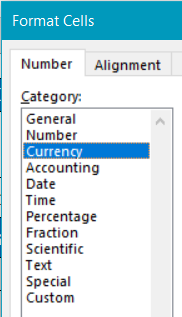
- In the Symbol field, select the symbol that represents the converted currency type
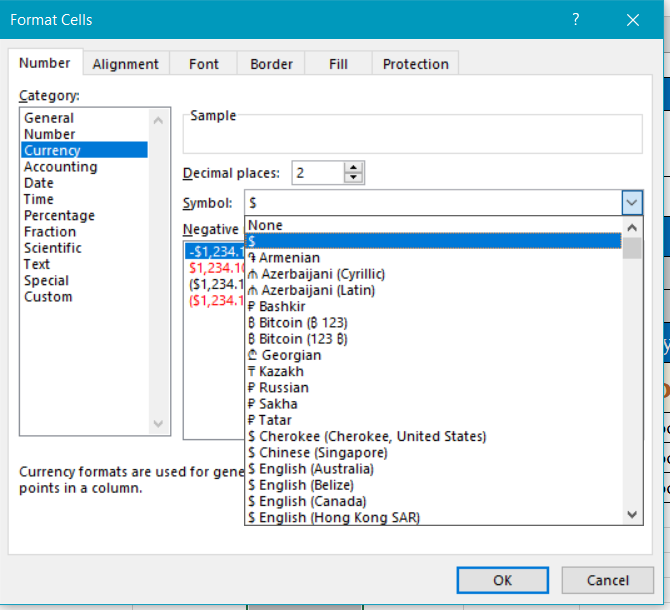
- Type the first letter of your currency name to jump down the list faster
- Click OK to apply your changes
For more information, or to send in a request to the Janitorial Manager support department, use the red 'Help' button in the bottom right corner of any Help Desk article.
Comments
0 comments
Please sign in to leave a comment.